Repair Water-Damaged Photos: What You Can Still Save
Water stains, warping, and mold spots don't have to mean a photo is lost for good. In minutes, you can pull faces and details back from a flood- or leak-damaged print.
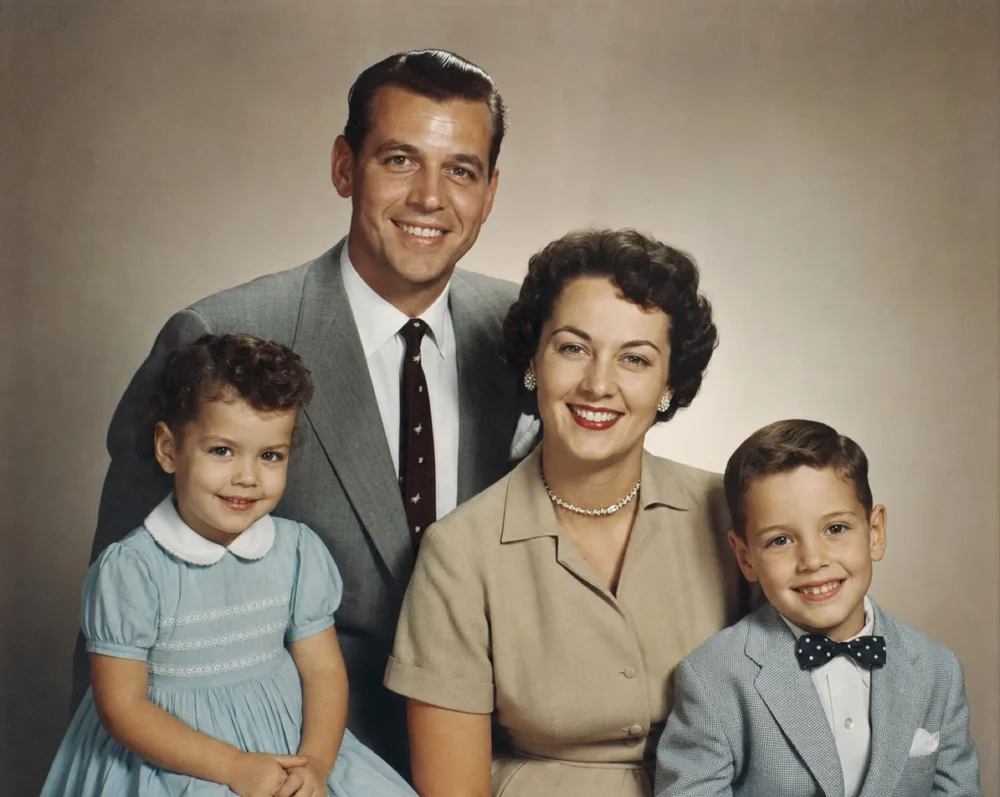
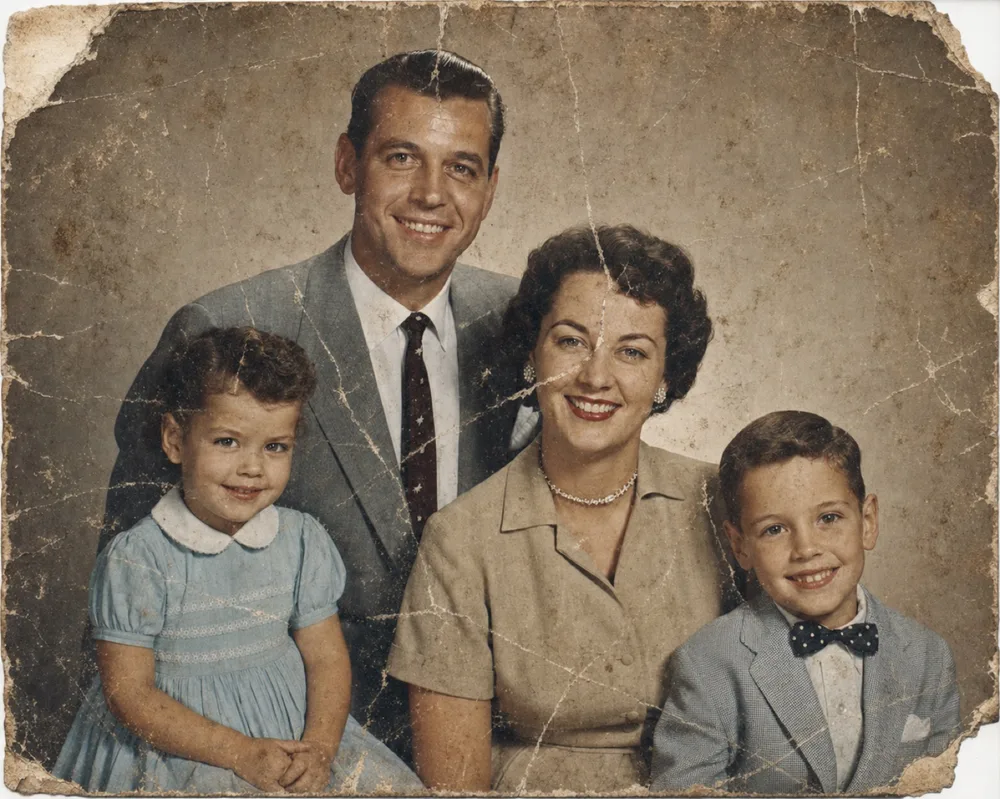
Drag to compare before & after
Most water-damaged photos can be partially or fully repaired, even when the emulsion has lifted, colors have bled, or mold has left dark blotches across a face. AI restoration rebuilds what water destroyed — filling in missing texture, correcting discolored patches, and sharpening the detail that survived — so you get back a usable, shareable photo instead of a stained print curling in a drawer.
Basements flood. Roofs leak. A box of photographs left in a humid garage or attic starts developing mold spots within days. Whatever the cause, water damage keeps getting worse the longer a photo sits untouched, so the two things that matter most are digitizing it soon and understanding what a restoration can and can't bring back.
What Water Damage Actually Does to a Photograph
Water gets into a photograph the way it gets into anything porous: fast and unevenly. The gelatin emulsion that holds the image swells, softens, and can lift right off the paper backing, taking detail with it. Dyes bleed sideways along the fibers, which is why water damage often shows rippling color halos instead of clean, contained stains. Left wet against another print, two photos can fuse together at the emulsion layer, and pulling them apart tears the image rather than separating it cleanly.
The visible symptoms follow a pattern most people recognize once they've seen it: brownish tide lines where the water evaporated and left mineral residue, patches where color has shifted toward yellow or pink, warping from repeated wet-dry cycles, and a slightly glossy or crackled texture where the emulsion resoftened and dried unevenly. Faces are often hit hardest, since any bleeding or lifting there destroys the fine detail a viewer's eye goes to first.
Mold is a separate problem that often rides along with water damage. Photos stored in a damp box or a flooded basement can develop mold within a day or two, showing up as fuzzy gray-green patches or dark speckling that eats into the emulsion rather than just sitting on top of it. The longer mold stays active, the more of the actual image data it consumes.
What Can Be Recovered — and What Can't
Not every water-damaged photo is a lost cause, and not every one can be fully brought back — the honest answer sits between those two extremes. If water only touched the surface briefly and dried without major staining or emulsion loss, restoration can usually remove tide lines, correct discoloration, and recover most of the original detail. The Restore tool is built for exactly this: stains, creases from warping, and the faded, shifted color that water leaves behind.
Where a photo has larger damaged regions — a corner where the emulsion lifted completely, a face partially dissolved by prolonged soaking, or a section eaten away by mold — the Recreate tool rebuilds those areas using the surrounding image as context. It works well when enough of the photo survives to establish who's in it and what the scene looked like; it can't invent a face with no remaining reference points anywhere in the print.
What can't be recovered is image data that's genuinely gone: paper that disintegrated into pulp, ink washed out to bare white with no shadow or outline left, or a print so fused to another that separating them destroyed both. In those cases, restoration can still clean up whatever partial image survives, but it works from what's there — it can't reconstruct a photograph from nothing.
- Usually recoverable: tide lines, color shift, surface staining, mild warping, faded or muted areas
- Often recoverable with Recreate: torn or lifted corners, partially dissolved faces, mold-eaten sections with visible surrounding context
- Rarely recoverable: completely bleached-out areas with no remaining detail, disintegrated paper, prints fused and torn apart
Why You Should Digitize Before It Gets Worse
Water damage is not static — it keeps changing the photo after the flood or leak is over. Residual moisture trapped in a stack of photos continues to feed mold growth for days or weeks. Tide lines that look faint when a print is still damp often darken as they dry and the minerals in the water concentrate along the drying edge. A photo that seems only mildly affected today can develop deeper staining, curling, or brittleness within a month if it isn't dried and handled properly.
This is why digitizing a water-damaged photo should happen as soon as it's safely dry enough to handle, not after you've decided how to store or frame it long-term. A photograph or scan captures the image at its current state, and that digital copy becomes the working file for restoration — even if the physical print keeps degrading afterward. Waiting to "deal with it later" is how usable detail quietly disappears.
The Right Workflow for a Water-Damaged Print
Handle a wet or recently dried photo by the edges only, and resist the urge to peel apart photos that have stuck together — that's the fastest way to lose the image entirely. If prints are still damp, air-dry them flat on a clean, absorbent surface out of direct sunlight before doing anything else; direct heat or forced fast drying tends to worsen warping and cracking. Once a photo is dry enough to handle without flexing, it's ready to be captured.
Photograph or scan it in even, diffused light with no glare across the surface — a phone camera works fine as long as the photo lies flat and fills the frame. From there, run Restore first to address staining, tide lines, and general fading; this handles the bulk of typical water damage. If sections are still missing or badly distorted after that, follow up with Recreate to rebuild those specific areas. A final pass with Enhance sharpens the recovered detail, particularly useful for faces that lost sharpness in the affected regions.
When a Photo Is Only Partly Recoverable
It helps to set realistic expectations before you start. A photo that spent hours submerged, where the emulsion has visibly separated from the paper or the image has washed down to blank white in large areas, may only be partially recoverable — restoration can clean up and sharpen what remains, but it works with the information present in the print, not what used to be there. In these cases, it's still worth digitizing what's left; even a partial recovery preserves more than the deteriorating original will hold onto over time.
If a family collection includes both mildly and severely affected photos, it's reasonable to prioritize the ones with more surviving detail first — faces, group portraits, anything irreplaceable — and treat the more damaged prints as a slower project. The goal isn't perfection on every single photo; it's rescuing as much of the visual record as the water left behind.
Step by step
- 1
Dry the photo safely first
Lay damp prints flat on an absorbent surface out of direct sunlight, and never peel apart photos that have stuck together — let them dry, then work on separation carefully or capture them as-is.
- 2
Photograph or scan it in even light
Once the photo is dry enough to handle without flexing, capture it with a phone camera or scanner in diffused light with no glare, filling the frame edge to edge.
- 3
Run Restore for stains and creases
Restore clears tide lines, color shift, and warping-related creases, handling the majority of typical water damage in one pass.
- 4
Use Recreate for missing sections
If mold or prolonged soaking left larger areas dissolved or blank, Recreate rebuilds those regions using the surrounding image as context.
- 5
Finish with Enhance
A final Enhance pass sharpens recovered detail, especially useful for faces that lost crispness in the previously water-affected areas.
Common questions
Can water-damaged photos really be restored?
Most can be at least partially restored. Surface staining, tide lines, discoloration, and warping-related creases are typically fully recoverable; only areas where the image has completely dissolved or washed away are limited by how much original detail remains.
What if two photos are stuck together after a flood?
Don't force them apart while damp — let them dry first, since pulling wet emulsion apart tears the image. If they're too fused to separate cleanly once dry, photograph whichever side is more visible and restore from that.
Does mold on a photo mean it's ruined?
Not necessarily. Mold that's only sitting on the surface can often be cleaned up in restoration, but mold that has been active for weeks may have eaten into the emulsion in that area, leaving less original detail to recover.
How long do I have before a water-damaged photo can't be saved?
There's no fixed deadline, but damage compounds quickly — mold can start within 24 to 48 hours, and staining tends to darken as a print dries. Digitizing within the first few days gives you the most detail to work with.
Can the app recover a photo where the image has completely washed away?
No — restoration works with the image data present in the print. If an area has faded to bare white or blank paper with no remaining shadow or outline, that specific area can't be reconstructed, though the rest of the photo can still be restored.
Should I clean the photo myself before scanning it?
Avoid wiping, rubbing, or using cleaning products on the emulsion side, since that can remove more image than it saves. Let it air-dry undisturbed, gently brush off loose debris once dry, then scan or photograph it as-is.
Still have a question? Email us
Tools & guides for this
Restore Old Photos with AI
Erase scratches, stains, creases, and tears from old prints. OldtoLife rebuilds the damaged areas of a photo so a worn picture looks whole again — in about ten seconds.
Recreate a Severely Damaged Photo Portrait
When a portrait is torn or stained so badly that a whole section of a face is gone, Recreate rebuilds what's missing using AI trained on human facial structure — aiming for a natural likeness, not just a patched-over hole.
Enhance Photo Quality: Sharpen Blurry Faces & Boost Resolution
Turn soft, blurry, low-resolution photos into sharp, detailed images — Enhance recovers the fine detail old cameras and scans lost, without changing the photo's original color or character.
How to Restore Water-Damaged Photos
Water can warp paper, blur ink, and fuse photos together, but most of the damage is reversible if you act calmly and in the right order.
Common Types of Photo Damage (and What Causes Them)
Old photos don't fall apart randomly — they fail in a handful of recognizable ways, and knowing which one you're looking at makes fixing it a lot less guesswork.
Restore Ancestor Photos for Your Family Tree
The one surviving photo of a great-great-grandparent is often faded, torn, or missing a corner — restoring it turns a fragile keepsake into a clear portrait you can attach to your family tree and pass down.
Restore Old Family Photos
The family photos in a shoebox are often the only images you have of the people who came before you. OldtoLife helps you repair and revive them before they fade any further.
How to Restore Torn Photographs
A tear doesn't have to mean a photo is gone for good. Handle the print carefully, capture it well, and digital repair can close the gap so the tear disappears.
Remove Scratches, Scuffs, and Tape Marks from Old Photos
The Restore tool lifts scratches, scuffs, dust, and tape marks from an old photo in about ten seconds, without smoothing away the detail underneath.
Your memories deserve to be seen clearly
Download OldtoLife and restore your first photo in seconds. Every tool is free to try — no account needed.