Recreate a Severely Damaged Photo Portrait
When a portrait is torn or stained so badly that a whole section of a face is gone, Recreate rebuilds what's missing using AI trained on human facial structure — aiming for a natural likeness, not just a patched-over hole.
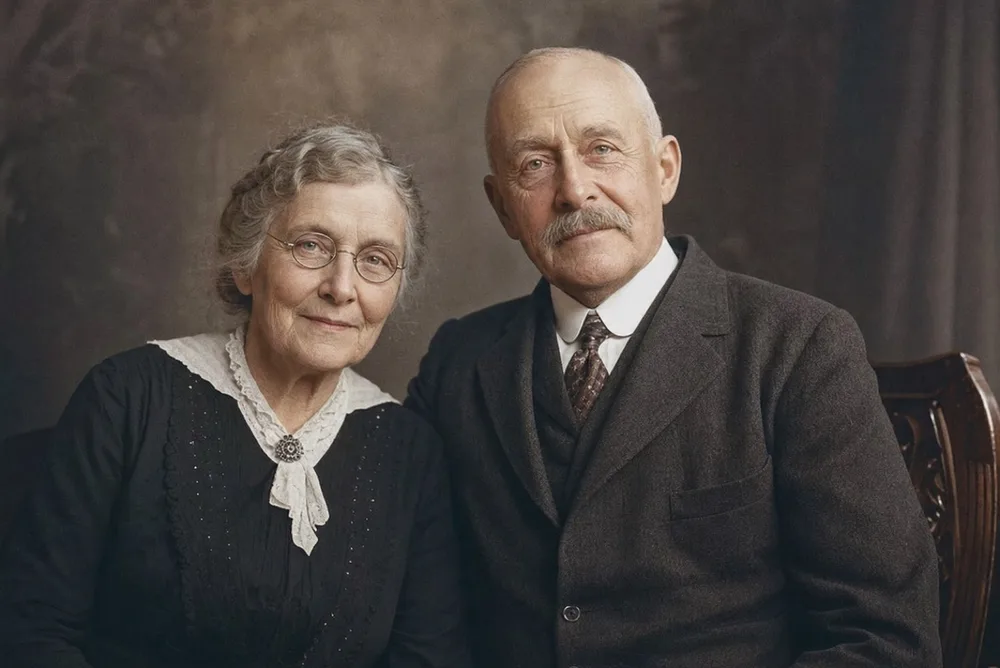
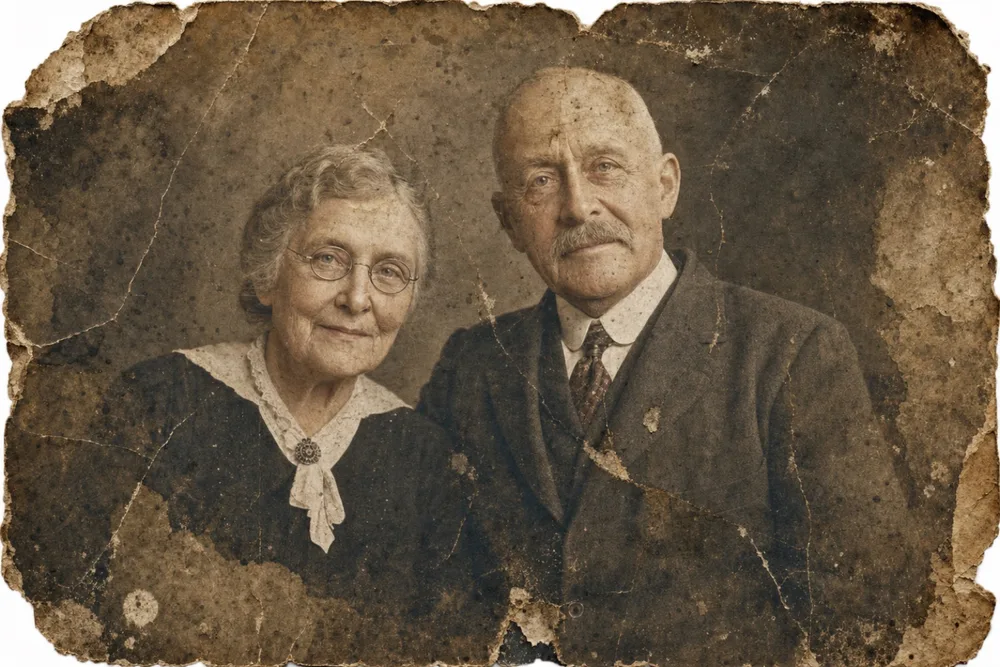
Drag to compare before & after
Recreate is the OldtoLife tool built for portraits damaged beyond what simple restoration can fix — photos where the damage didn't just mark the surface but tore away an eye, half a face, or an entire section of the print. It reconstructs the missing area using AI trained on human facial structure, working outward from whatever survived.
This goes further than removing a scratch or stain. It's a genuine rebuild, so it's worth understanding both what it can do and what it can't before you rely on it for a portrait that matters.
When You Need Recreate Instead of Restore
Restore is built to erase scratches, stains, and creases sitting on top of an otherwise intact image. Recreate exists for the harder case: a photo where the damage didn't just mark the surface, it took a whole section of the picture with it — a corner torn clean off through someone's cheek, an ink stain that swallows half a face, or a fold worn so thin over decades that the paper cracked apart along someone's eye.
If you can still make out most of the features and only need the surface cleaned up, Restore is usually the right tool and the faster one. Reach for Recreate when a meaningful part of a face — an eye, a mouth, an entire profile — simply isn't there anymore in the original print.
- A tear or missing corner cuts through an eye, nose, or mouth
- Water or ink damage has erased a large section of the face
- Folding or creasing has cracked away part of the image entirely
- Fire, mold, or chemical damage has destroyed a portion of the print
- Only a fragment of the original photo survives
How the AI Rebuilds a Missing Face
Recreate works from what's left. The AI studies the visible parts of the portrait — the shape of the head, the angle of the shoulders, whatever features survived — and uses a model trained on human facial structure to infer what the missing section most likely looked like.
It draws on general knowledge of how faces are built: symmetry between the left and right side, how an ear sits relative to a jawline, how light falls across skin and hair. That's different from fixing a scratch, where the original detail sits just outside the damaged pixels waiting to be extended inward. In a genuinely destroyed section, there's no hidden original data to recover — the AI is generating a plausible face, not retrieving one.
Reconstruction, Not a Time Machine: Setting Honest Expectations
This is the most important thing to understand before you use Recreate on a badly damaged portrait: when the AI fills in a missing eye or a torn-away section of a face, it's producing its best reconstruction based on the surrounding evidence, not recovering a hidden photograph. For minor gaps — a corner clipped through part of a cheek — that reconstruction tends to land very close to the original, because most of the face is intact and the model has plenty to work from.
For severe damage, where most of one side of a face is gone, treat the result as a respectful, lifelike rendering rather than a guaranteed likeness. If you have even one other photo of the same person, keep it on hand for comparison alongside the rebuilt version. Recreate is designed to give a family a usable, presentable portrait when the alternative is a photo that's unrecognizable or missing altogether — it earns its place for exactly those photos, with expectations set accordingly.
Getting the Best Result from Recreate
The more of the original portrait that survives, the more the AI has to work with. A photo with most of a face intact and one torn corner will rebuild more faithfully than a print where an entire side of the head is missing.
Photograph or scan the damaged print in good, even light before uploading, and avoid cropping away any surviving detail — every intact pixel near the damaged area helps the reconstruction. If the parts that did survive also show scratches or fading, running Restore afterward cleans up the rest of the print.
- Use the highest-resolution scan or photo of the damaged print you have
- Don't crop out surviving detail near the missing section
- Light the print evenly to avoid glare over the damaged area
- Follow up with Restore for any scratches or stains that remain
- Add color with Colorize once the portrait is whole again
When to Combine Recreate with Other Tools
A badly damaged portrait rarely needs just one pass. Once Recreate has rebuilt the missing section, the print will often still show fading, scratches, or a dull black-and-white cast that other OldtoLife tools handle better.
Run Restore afterward for any remaining surface damage, Brighten if the original print faded dark or dim, and Colorize if it's a black-and-white photo you'd like to see in natural color. Treat Recreate as the first, structural repair — the pass that makes the portrait whole — before you polish it further.
How to do it, step by step
- 1
Open OldtoLife and tap Recreate
Launch the app and choose Recreate from the home screen — it's built specifically for portraits with large missing or destroyed areas.
- 2
Choose the damaged portrait
Select the photo from your camera roll, using the sharpest scan or phone photo of the print you have.
- 3
Let the AI reconstruct the missing section
OldtoLife analyzes the surviving parts of the face and rebuilds the damaged area, usually finishing in about ten seconds.
- 4
Review the result carefully
Compare the rebuilt portrait with the original using the before/after slider, and check it against any other photos of the person if you have them.
- 5
Save, refine, and share
Save the high-resolution result to your gallery, run Restore or Colorize if the print needs further cleanup, then share it with family.
Recreate a Severely Damaged Photo Portrait — FAQ
Can Recreate rebuild a face that's completely torn away?
Yes, if enough of the surrounding portrait survives to give the AI context — hair, shoulders, the other side of the face. The more that's intact, the more faithful the reconstruction; if almost nothing of the original remains, results will vary.
How is Recreate different from Restore?
Restore removes surface damage like scratches and stains from an otherwise intact photo. Recreate is for portraits where a whole section — an eye, a cheek, an entire side of a face — is physically missing or destroyed and needs to be rebuilt.
Will the rebuilt face look exactly like the person did?
For minor gaps it's usually very close, since most of the face survives. For severe damage, treat the result as a respectful, lifelike reconstruction rather than a guaranteed likeness, especially if the missing area was large.
Should I use another photo of the same person for reference?
OldtoLife works from the single photo you upload. If you have another photo of the same person, it's worth keeping nearby to compare against the rebuilt result.
Is Recreate free to try?
Yes. Recreate is free to try, and a Premium subscription removes daily limits and unlocks unlimited use with full-HD downloads.
What if only a fragment of the photo survived?
Recreate can still attempt a reconstruction from a fragment, but results depend heavily on how much of the face and surrounding context remain — a small torn corner rebuilds more reliably than a photo reduced to a sliver.
Still have a question? Email us
Related tools & guides
Restore Old Photos with AI
Erase scratches, stains, creases, and tears from old prints. OldtoLife rebuilds the damaged areas of a photo so a worn picture looks whole again — in about ten seconds.
Enhance Photo Quality: Sharpen Blurry Faces & Boost Resolution
Turn soft, blurry, low-resolution photos into sharp, detailed images — Enhance recovers the fine detail old cameras and scans lost, without changing the photo's original color or character.
Restore Ancestor Photos for Your Family Tree
The one surviving photo of a great-great-grandparent is often faded, torn, or missing a corner — restoring it turns a fragile keepsake into a clear portrait you can attach to your family tree and pass down.
How to Restore Military and Veteran Portraits
A service photo that was folded into a wallet and carried for years deserves careful repair. OldtoLife smooths the creases and fading while keeping every stripe, medal, and face true to the original.
How to Restore Torn Photographs
A tear doesn't have to mean a photo is gone for good. Handle the print carefully, capture it well, and digital repair can close the gap so the tear disappears.
How to Recreate a Damaged Portrait
When part of a portrait is torn away, water-damaged, or missing entirely, fixing it means more than cleaning up what's left — it means rebuilding what's gone using reference photos and careful reconstruction.
Your memories deserve to be seen clearly
Download OldtoLife and restore your first photo in seconds. Every tool is free to try — no account needed.