Common Types of Photo Damage (and What Causes Them)
Old photos don't fall apart randomly — they fail in a handful of recognizable ways, and knowing which one you're looking at makes fixing it a lot less guesswork.
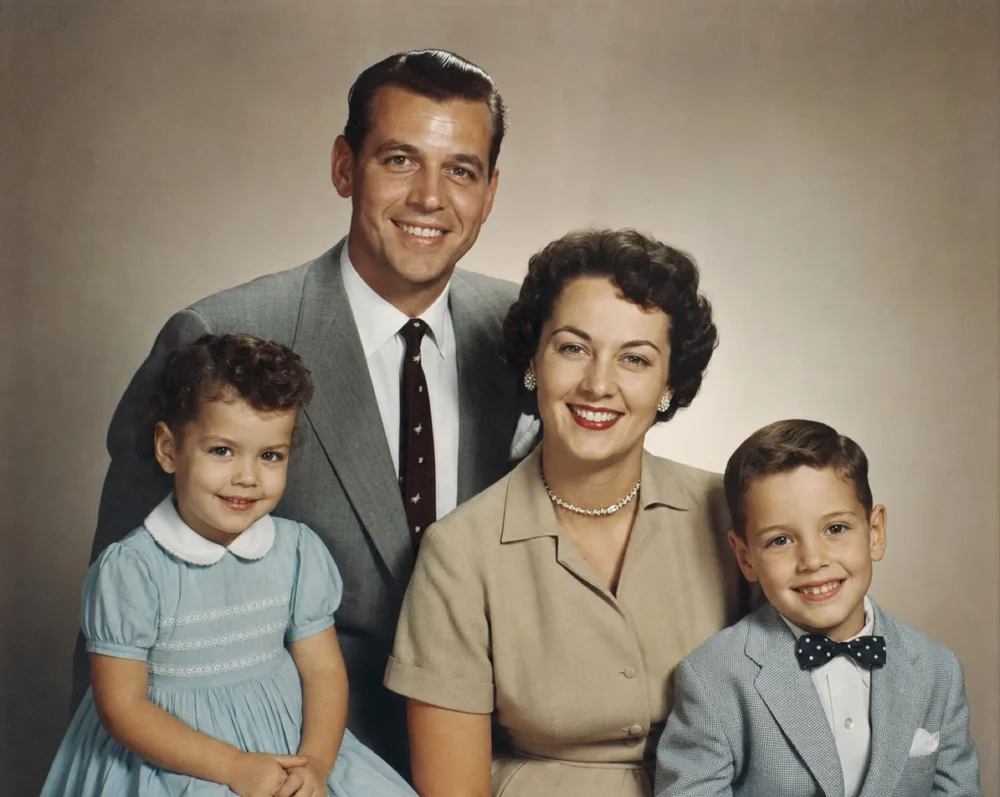
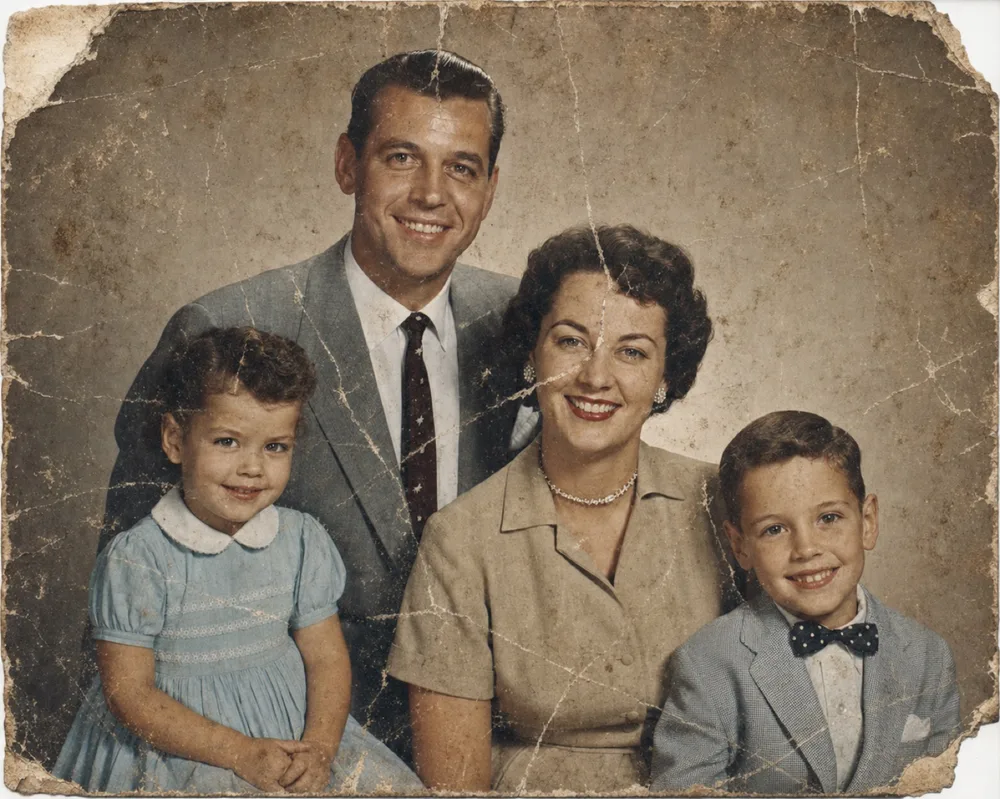
Key takeaways
- Photo damage falls into four main categories: physical (tears, creases, scratches, missing pieces), chemical (fading, yellowing, silvering, foxing), water/mold damage, and image-quality issues (blur, low resolution, poor exposure).
- Chemical changes like yellowing and silvering happen naturally over decades, even to photos that were carefully stored — they aren't a sign of neglect.
- Matching the fix to the damage type matters: torn or stained photos need reconstruction, faded ones need color and contrast correction, and blurry ones need sharpening.
- Digitizing a photo at high resolution before attempting any restoration protects the original and gives AI tools the most detail to work with.
The common types of photo damage fall into four groups: physical damage (tears, creases, scratches, missing pieces), chemical deterioration (fading, yellowing, silvering, foxing), water and mold damage, and image-quality loss (blur, low resolution, poor exposure). Most old photographs show more than one of these at once, since a print that's survived fifty or eighty years has usually been handled, stored, and exposed to light and humidity in ways that layer several kinds of wear on top of each other.
Knowing which category a photo falls into matters because the fix is different for each. A torn photo needs its physical structure repaired. A yellowed one needs its color corrected. A water-stained one needs the discoloration lifted without losing what detail remains. This guide walks through each type of damage, what causes it, and what actually helps — whether that's careful handling going forward or AI restoration tools like OldtoLife's Restore, Colorize, and Recreate.
Physical damage: tears, creases, and scratches
This is the damage you can feel with your fingers, not just see. Tears happen at the edges and corners first, usually from photos being pulled out of tight album sleeves or passed around at gatherings. Creases and folds come from being carried in a wallet, bent to fit an envelope, or pressed under something heavy in a drawer for years. Scratches are surface-level abrasions — a fingernail, a pen resting on top, or grit trapped between two stacked prints that scuffs the emulsion every time the stack shifts.
The most severe version of physical damage is a missing piece: a corner torn off entirely, a chunk gone from the middle of a face, or an area so abraded that no image information is left there at all. This is common in photos that were stored loose, mailed without protection, or salvaged from a fire or a move gone wrong.
Surface-level tears, creases, and scratches respond well to OldtoLife's Restore tool, which reconstructs the damaged area using the surrounding image as a guide. When a piece of the photo is missing outright — not just damaged, but gone — that calls for Recreate, which rebuilds larger missing sections of a portrait so the composition reads as whole again.
- Tears — usually starting at edges or corners, often following the grain of the paper
- Creases and folds — permanent lines from being bent, carried, or improperly stored
- Scratches — thin surface marks from friction or debris trapped against the print
- Missing corners or pieces — sections physically absent, with no image data left
Fading, yellowing, and other chemical changes
Photographic prints are chemical objects, and chemicals change over time whether or not anyone mishandles them. Black-and-white prints made with silver-based processes can develop a bluish, metallic sheen in the darkest areas — photo conservators call this silvering, and it happens as silver particles migrate to the surface after decades of exposure to air. Color prints fade differently: the dyes used in mid-20th-century color photography break down unevenly, so reds and yellows often outlast blues and greens, leaving a photo that looks washed-out or oddly orange.
Yellowing and browning across an entire print usually comes from acid in the paper itself or from acidic materials touching it — an old album page, a manila envelope, cardboard backing. Foxing, the small reddish-brown spots that show up especially on paper-based prints, comes from a mix of fungal growth, humidity, and impurities in the paper stock. None of this means the photo was neglected; it's closest to what happens to newspaper left in sunlight, just slower.
Fading and yellowing are exactly what OldtoLife's Colorize and Brighten tools address. Colorize adds natural, period-appropriate color to black-and-white or badly faded photos, while Brighten corrects the washed-out, low-contrast look that comes from decades of chemical fade — without making the photo look artificially processed.
Water damage, stains, and mold
Water is one of the more dramatic causes of photo damage because it acts fast and leaves a visible trail. A photo that's been wet shows tide lines — pale, ring-shaped stains where water evaporated and left dissolved chemicals behind at the edge of the wet area. If the print dried while pressed against another surface, the emulsion (the image layer) can stick and tear away when separated, leaving patches of missing image. Paper that's been wet and dried repeatedly often warps or buckles permanently.
Damp storage over long periods — a basement, an attic without climate control, a box left in a garage — invites mold and mildew, which shows up as fuzzy discoloration or the same reddish foxing spots mentioned above, just concentrated in patches where moisture pooled. Flood damage is the extreme case: photos submerged for even a few hours can lose large areas of image entirely, on top of staining and warping.
Restoring a water-damaged photo means lifting the discoloration and stains while working around whatever image data survived. OldtoLife's Restore tool handles staining, tide lines, and warped-looking areas well; for photos where water damage took out a significant portion of a face or scene, Recreate can rebuild what's missing using the rest of the photo as reference.
Blur, low resolution, and poor exposure
Not all photo damage is about the physical print — sometimes the problem was baked in the moment the shutter clicked. Blur comes from camera shake, a moving subject, or a lens that simply wasn't in focus, and it was far more common before autofocus and image stabilization existed. Low resolution is a separate issue: older cameras captured less detail to begin with, and photos scanned at a low setting — or photographed with a phone instead of properly scanned — lose even more sharpness in the digitizing process.
Exposure problems go both ways. Underexposed photos look dark and murky, with faces lost in shadow; overexposed ones look washed out and flat, with highlights blown out to plain white. Indoor flash photography from decades ago is a frequent culprit, along with prints that were correctly exposed originally but have since faded unevenly, throwing the balance off.
These issues aren't damage in the traditional sense, but they're just as often the reason a treasured photo is hard to look at. OldtoLife's Enhance tool sharpens blurry faces and recovers detail lost to low resolution, and Brighten rebalances photos that are too dark or too washed out — two of the more common fixes people reach for once the physical damage is handled.
Step by step
- 1
Look at the photo in good light
Tilt it under a strong, even light source to spot surface scratches, silvering, and faint water stains that are easy to miss in dim light.
- 2
Sort the damage into categories
Note whether you're dealing with physical damage (tears, creases, missing pieces), chemical fading, water staining, or simply blur and poor exposure — most photos have more than one.
- 3
Digitize the photo before doing anything else
Scan it flat at a high resolution, or photograph it straight-on in even light, so you have a safe digital copy before any further handling risks more damage.
- 4
Match the fix to the damage type
Use a restoration tool suited to what you found — Restore for tears, creases, and stains, Recreate for missing sections, Colorize for faded black-and-white prints, and Brighten or Enhance for exposure and blur.
- 5
Compare and save the result
Check the restored version against the original with a before/after view, then save the high-resolution result somewhere more durable than the original print.