Restore Photos of Loved Ones Who Passed Away
A single clear photograph can become the image you turn to most often when you want to remember someone — steady, warm, and free of the damage time left on it. OldtoLife restores it gently, so what you keep is still a true likeness, not an invented one.
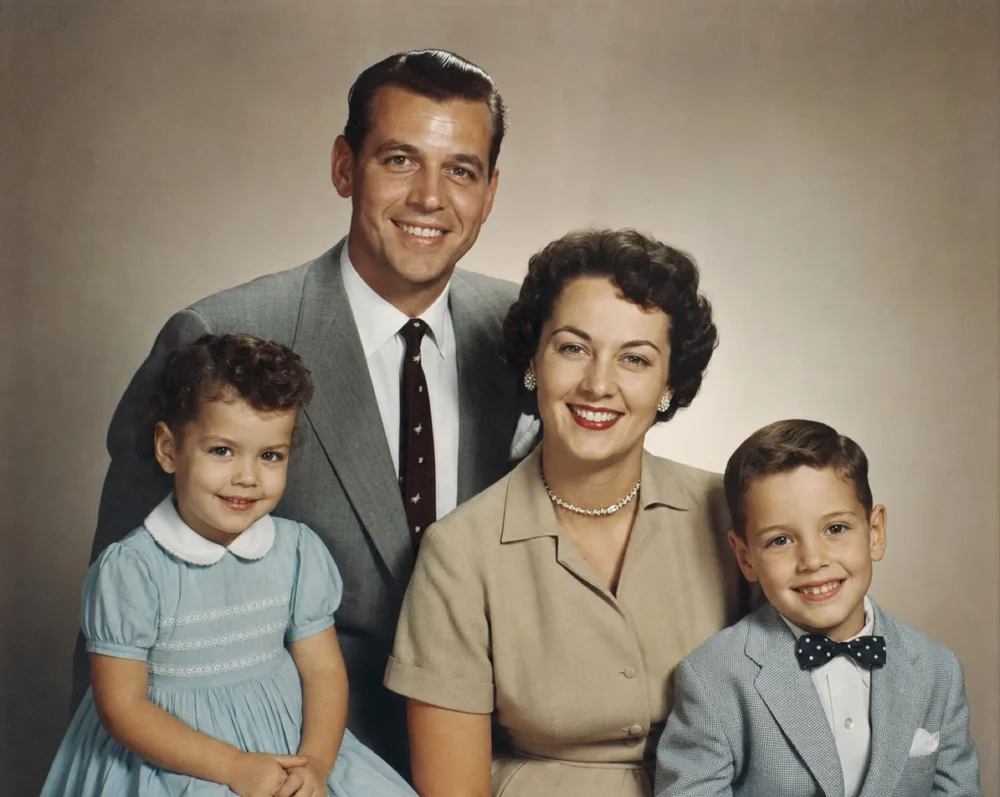
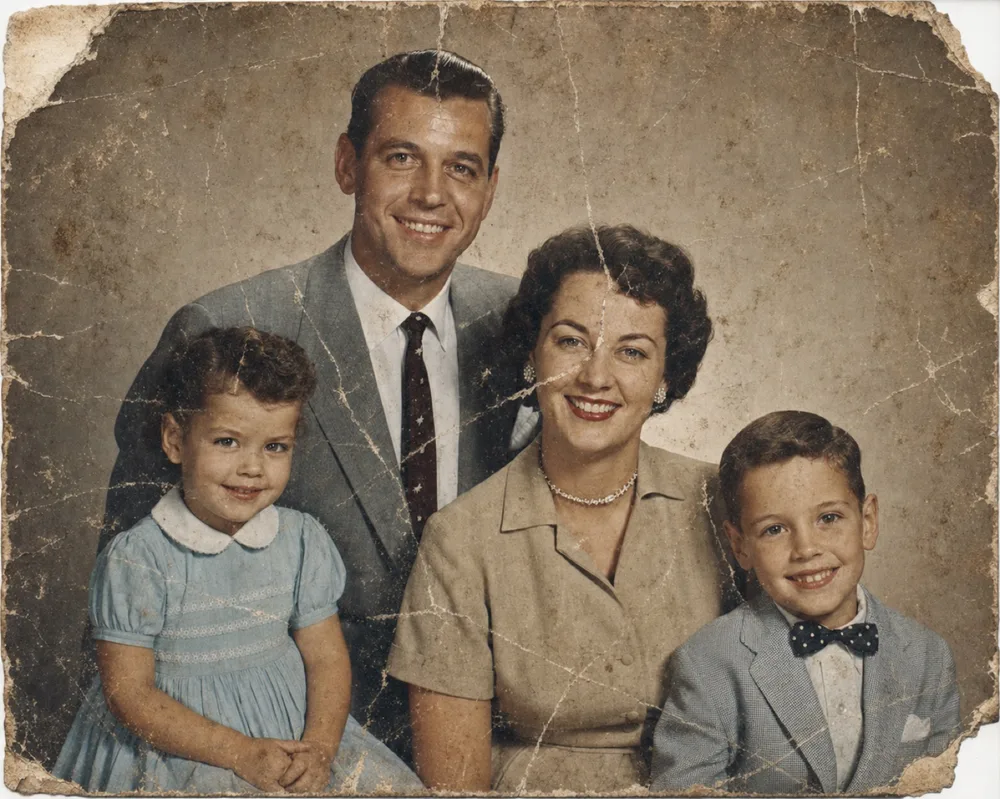
Drag to compare before & after
To restore a photo of someone who has passed, OldtoLife repairs scratches, tears, and fading, sharpens a blurred face, and corrects dark or discolored areas — all while keeping the person's actual likeness intact. The goal isn't to reinvent the photo; it's to remove what time and handling did to it, so the picture looks the way it did when it was first taken.
This kind of photo carries a different weight than an everyday snapshot. It might be the image printed for a memorial service, framed on a shelf, or the one you open on a birthday you now mark without them. OldtoLife treats it that way — processing it to return only your result, and letting you review it before deciding whether it's right.
Why photos of someone who's gone are different to restore
A photo of someone who has died is often the one photo — not one of many identical shots from a phone, but a rare, singular image, sometimes the only clear picture that exists. Because it's been handled since, tucked into a wallet, propped in a frame, or kept in a box for years, it usually carries visible wear: a crease across the face, a water stain in one corner, ink bled through from the back of the print, or color that's shifted with age.
That scarcity changes how you approach the repair. There's little room for guesswork and no interest in a photo that looks different from how the person actually looked. Restoring a photo like this isn't about improving it artistically — it's about getting back to what was there before the damage, as closely and honestly as possible.
What OldtoLife can restore in this kind of photo
Restore is the tool most people reach for first. It removes scratches, tears, creases, stains, and general fading without altering the person's features or expression — the same face, just without the damage layered on top of it.
If the photo is black and white or has faded into sepia, Colorize adds natural, period-accurate color. This is often the step that makes a photo feel less like an archive image and more like a living memory — skin tone, hair color, and the color of a familiar shirt or dress brought closer to how you remember it, or how family members describe it.
- Creases from being folded and carried in a wallet
- Water stains and warping
- Ink bleed-through from the back of the print
- Fading to yellow or sepia
- Torn corners or edges
Repairing a photo when part of it is missing
Some of the photos people hold onto longest are also the most damaged — a wallet photo folded so many times the crease has worn through, or a print that was water-damaged and lost part of a face or shoulder. For these, Recreate is built to rebuild the missing area using what remains in the rest of the photo as its guide, rather than replacing the whole image with something generic.
It works best when enough of the original is intact to anchor the reconstruction — most of the face, the general pose, the setting. Try Restore first for anything short of a genuinely missing section; save Recreate for photos where a real piece of the image is gone.
Turning a restored photo into a memorial or keepsake
Once a photo is repaired, people use it in different ways: printed and framed, added to a memorial slideshow or program, made into a keepsake shared with siblings and children, or simply saved as the photo they open when they want to see that person's face again. The full-HD download is sized for printing, not just screen viewing, so it holds up at a larger size for a frame or an order of service.
It's worth saving a digital copy for the rest of the family too, sent through a group chat or shared album, so more than one person has it and a fragile original no longer has to be the only surviving version.
- Printed and framed for the home
- Included in a memorial service slideshow or printed program
- Made into a shared keepsake for siblings or children
- Saved to a family photo archive alongside other restored photos
Doing this with care, at your own pace
There's no reason to rush this. Some people restore a photo the week of a funeral, needing something to print quickly; others come back to it months or years later, when they're ready. OldtoLife doesn't require you to do anything with the result right away — it's there when you want to look at it, print it, or share it.
Your photo is processed only to return the restored version to you. It isn't sold, and it isn't used to train unrelated models. You can review the result privately before deciding whether to keep it, download it, or try a different tool on the same photo.
Step by step
- 1
Pick the clearest surviving photo
Choose the print with the truest likeness, even if it's damaged — a clear but worn photo usually gives a better result than a blurry one.
- 2
Digitize it in good light
Photograph or scan the print flat, in even light, avoiding glare and shadows across the face.
- 3
Repair the damage with Restore
Open the photo in OldtoLife and tap Restore to remove scratches, creases, stains, and fading.
- 4
Add color or rebuild missing areas
Use Colorize for a black-and-white photo, or Recreate if part of the image — a corner, an edge, a piece of the face — is genuinely missing.
- 5
Download the HD version to keep or print
Save the full-resolution result for framing, a memorial print, or sharing with family who hold the same photo dear.
Common questions
Will restoring the photo change how my loved one looked?
No. OldtoLife repairs damage — scratches, fading, tears — without altering the person's features or expression. The aim is to recover what was in the original photo, not to change it.
Can I restore a photo that's torn or missing part of the image, like a worn wallet photo?
Yes. The Recreate tool rebuilds missing sections using the rest of the photo as its guide. It works best when most of the face and setting are still intact.
Is it appropriate to upload a photo of someone who has died?
Yes. Your photo is processed only to return your restored result and is not sold or used to train unrelated models. You can review the result before saving or sharing it.
Can I add color to an old black-and-white photo of them?
Yes. After repairing any damage with Restore, use Colorize to add natural, period-accurate color to a black-and-white or sepia photo.
How long does the restoration take?
Each tool takes about 10 seconds to process, so you can restore a photo the same day you need it — for a service, a print, or simply to look at.
Can I print the restored photo for a memorial or keepsake?
Yes. A Premium subscription unlocks full-HD downloads, which hold up well at print size for framing, a program, or a keepsake.
Still have a question? Email us
Tools & guides for this
Restore Old Photos with AI
Erase scratches, stains, creases, and tears from old prints. OldtoLife rebuilds the damaged areas of a photo so a worn picture looks whole again — in about ten seconds.
Colorize Black and White Photos with AI
Add natural, period-accurate color to black-and-white and sepia photos in about ten seconds — no manual painting, no guesswork, just a believable result you can compare side by side with the original.
Recreate a Severely Damaged Photo Portrait
When a portrait is torn or stained so badly that a whole section of a face is gone, Recreate rebuilds what's missing using AI trained on human facial structure — aiming for a natural likeness, not just a patched-over hole.
Restore Ancestor Photos for Your Family Tree
The one surviving photo of a great-great-grandparent is often faded, torn, or missing a corner — restoring it turns a fragile keepsake into a clear portrait you can attach to your family tree and pass down.
How to Recreate a Damaged Portrait
When part of a portrait is torn away, water-damaged, or missing entirely, fixing it means more than cleaning up what's left — it means rebuilding what's gone using reference photos and careful reconstruction.
How to Restore Torn Photographs
A tear doesn't have to mean a photo is gone for good. Handle the print carefully, capture it well, and digital repair can close the gap so the tear disappears.
Your memories deserve to be seen clearly
Download OldtoLife and restore your first photo in seconds. Every tool is free to try — no account needed.